Traditional HMI-based recovery
INDUSTRIAL TOUCH PANEL
01Manual
02Reset
03Origin
04Auto
05Start
06Running
CURRENT OPERATOR STEP
Production overview. No active alarm.
GENERIC PANEL · NO VENDOR BRANDING
Simulated recovery time00:00
NORMAL PRODUCTION
Machrion designs, integrates, and supports practical automation around the equipment already on your floor—from PLC and robot integration to guided machine recovery with MAP.
MAP in production
Observed across multiple production lines and process areas.
Based on total recorded downtime hours across the five deployed machines, comparing the month before deployment with the first month after deployment.
Explore production use cases →What Machrion does
We start with the operation as it exists, then build the right combination of controls, software, data, and on-site support around the real constraint.
Interactive demo
Watch one simulated machine fault replay through a traditional HMI sequence and a machine-aware MAP workflow. Both paths begin together after the simulated safety conditions are restored.
Production overview. No active alarm.
One common fault is replayed as two alternative recovery experiences.
MAP is ready to respond to a defined machine condition.
Multiple screens · Sequence knowledge required · Manual navigation
Machine-aware · Approved workflow · Guided recovery
The simulated timing illustrates interface flow only. MAP works within approved machine procedures; physical safety devices, machine permissives, and the existing control architecture remain authoritative.
Actual MAP product interface
MAP brings machine state, approved procedures, and operator guidance into one machine-specific interface—configured around the controls already on the floor.
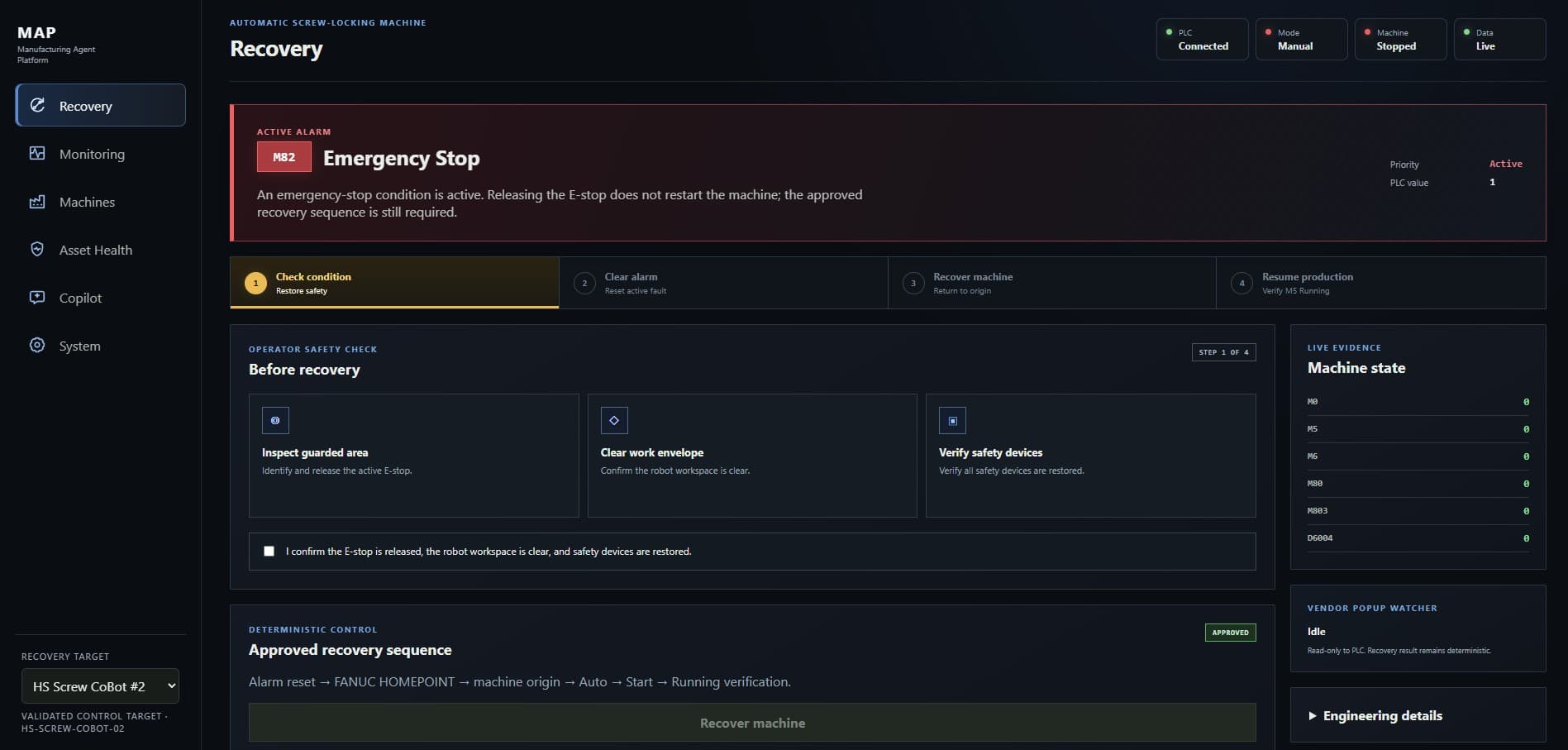
Bring defined PLC states, alarms, modes, and equipment signals into one operational view.
Present approved diagnostic or recovery procedures with the conditions and sequence attached.
Capture useful machine-specific context so support does not depend on memory alone.
MAP in the field
Explore how MAP was applied across different control stacks, robot platforms, and production contexts.
Explore production use cases →Beyond the demo
MAP is one part of a broader automation practice built for existing production environments.
Understand the machine, its controls, recurring stops, and operator workflow.
Connect PLCs, HMIs, robots, sensors, vision, and industrial data sources.
Configure machine context and approved guidance around defined operational needs.
Commission, document, train, refine, and support the deployed solution.
A practical first step
Bring us the recurring stop, manual process, or integration gap that costs your team time.
Configure your machine →